Direct Internet Access
SD-WAN can be used in Standalone/Direct Internet Access mode/Local Break deployment. These are also commonly referred to as DIA/LBO.
DIA isa method of steering traffic across multiple internet links. These links are connected physically to the FortiGate firewall using different types of cabling medium. Typically one will be faster than the other.
Sensitive/critical traffic is typically always steered over the fastest/best path available. Non-critical traffic is either load-balanced across one or more links, or goes over the less-preferred path.
With DIA/LBO traffic is usually NOT being backhauled through a central DC/Site, which means its best to enforce strict security policies at these branch sites for internet traffic.
For routing we typically use static default routes, but BGP can be used between ISP and FortiGate. This typically happens when the site needs to advertise an public IP prefix that they have brought. Useful if they are hosting a web server that needs public access and not using the public IP the ISP provided them.
Upstream & downstream speeds can be set manually by an administrator or dynamically modified by SD-WAN. This is why SD-WAN is so dynamic in nature. Fortinet have an SD-WAN monitoring service that runs speed tests against FortiGuard, if it detects that the speeds have gone low, SD-WAN can automatically adjust based on this.
DIA can be deployed as a standalone FortiGate or in a HA deployment.
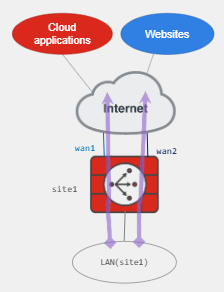
Below is an example diagram showing how a local site can break out to the internet directly. Both links are used to go over the internet. But we could make WAN1 go to cloud applications of our choice and WAN2 go to any other website.
Site-to-Site traffic
Usually companies use STS hub-and-spoke IPsec tunnels to securely tunnel corporate traffic across sites. These tunnels are overlay links established over underlays.
SD-WAN can monitor link quality of these tunnels and select best link for critical traffic.
We can use BGP typically to exchange routing information through the tunnel. This is good for scale.
Fortinet also have a feature called ADVPN Shortcuts. This basically means that instead of traffic going up to the hub, if it detects that the link is degraded it can form shortcuts with the other other site directly and go to it. So if we had London and Birmingham as spokes, and Manchester as the hub, the shortcut would be used between London & Birmingham.
For AD-VPN we typically use iBGP to preserve next hop information. Shortcuts are automatically created for Spoke-to-Spoke traffic. Spoke-to-Spoke tunnel can be offloaded from parent tunnels to these shortcuts. AD-VPN does require a FortiGate Firewall as the hub.
Remote Breakout
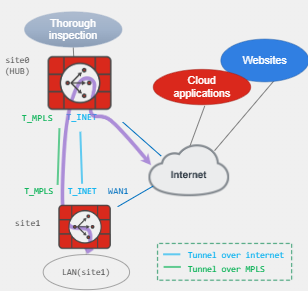
Remote Breakout is known as Secure Internet Access or SIA. Internet bound traffic from the spokes is backhauled through the hub FortiGate. Here it performs thorough inspection of the packets, after inspected it breaks out to the internet from the hub FortiGate.
This can be used for central internet and security. With this setup we can monitor all internet bound traffic from our spokes and enforce security policies based on this. The only FortiGate that needs to be powerful in this deployment is the Hub. The other FortiGate's do no inspection of traffic, just forwarding of the IP packets to the Hub FortiGate and the hub does all the security inspection.
It can also be used as a backup for DIA. If the local internet at the site has issues we can have traffic forward to the hub and then go out via the Hub.
Below is an example of Remote Breakout. We have the overlay built over MPLS. SD-WAN must be configured on both the branch sites and the hub to allow this Remote Breakout functionality.
Cloud On-Ramp
To understand Cloud On-Ramp you have to understand what a POP is. POP stands for Point of Presence and its a central location to steer your cloud application traffic to. I have personally seen this for Cisco Umbrella and Meraki, they use Cloud-On Ramp to integrate SD-WAN traffic upto Umbrella for DNS traffic rather than using the upstream DNS configuration.
It is the same concept here. We can establish overlays to the cloud providers built-in VPN cloud gateways. An alternative is to deploy a Cloud FortiGate and built the overlay tunnels to the Cloud FortiGate. The benefit of this is we can manage security on traffic entering or exiting the cloud.
Typically a Cloud On-Ramp connection is initiated from the spoke FortiGate as this ensures optimal performance and least latency. However we can always backhaul traffic through WAN links to the hub and have it go through the hub. They may do this because of better performance or due to company policy.
Comments