Why use SD-WAN for DIA?
- DIA is typically used when a branch site needs local internet breakout. This is useful when most of the applications that end users are accessing are SaaS applications located out on the internet. We can use SD-WAN to load balance across links to allow for accessing these SaaS applications.
- It leverages all available links to optimise cost and performance for end users. Sensitive traffic goes over best performing links and costly links are reserved for critical traffic or failover.
- SD-WAN is dynamic in nature so it can dynamically select the best performing link as well as prioritize business critical traffic.
- DIA also allows for a simpler deployment. Devices no longer have to backhaul traffic to the DC and then route out to the internet from the DC. A single FortiGate instead can do the traffic steering, routing, LAN segmentation and UTM protection.
- DIA can be deployed at any SD-WAN site that has multiple internet links. We can have redundant FTGs if we want.
DIA Planning - Devices & Links
Device Selection
- Is this a FortiGate physical appliance or a Virtual FortiGate? Select the FortiGate model based on interface requirements, and adequate performance and the expected security features. Fortinet offer a data matrix of their firewall models which you can find here: https://www.fortinet.com/content/dam/fortinet/assets/data-sheets/Fortinet_Product_Matrix.pdf
To help identify which devices to select will be based on the below queries:
- How many users & devices need to conenct via wired and wireless?
- How big is the building? How many floors?
- What location is DIA being used? Is it for a big bank or a small branch office?
- What security features are important to you? Is IPS and application control critical or loose requirements?
- Availability requirements? Is SLA high uptime? Or is it loose?
- Is HA required or can standalone deployment work?
This is a small list of requirements. It all really depends on the scale and scope of the project and deployment.
Underlay and Overlay Requirements
- At minimum 2 underlay WAN links are required for DIA. This helps in redundancy and load balancing.
- We can have two ISP links, or private optional MPLS, LTE, 4G, 5G links.
- In some parts of the world even satellite can be used but this can result in poor user experience compared to the other underlay options available.
- Regarding overlays, since these sites will be having DIA out to the internet typically we do not require secure IPsec tunnels out to our corporate sites. Traffic will just egress out to the internet.
DIA Routing Requirements
- Since DIA sites only typically need access to the internet there isn't much routing requirements.
- Static Default Route - This is typically what will be used to route LAN traffic out to the internet. Using complex routing isn't required. Group all WAN interfaces into an SD-WAN zone and using it as outgoing interface for the default static route.
- LAN Routing - Optionally we can have dynamic LAN routing such as via OSPF. This is useful if we have 3 or 4 VLANs that need to communicate with each other at layer 3 we can have the FortiGate act as the default gateway for those clients and then do the inter-VLAN communication.
DIA Security Requirements
FortiGate allows for IPS, Web-Filtering, Anti-Malware, RBAC, ZTNA etc. Below is a fantastic table from Fortinet on the security risks out there and where these security features can be enabled to protect the network.
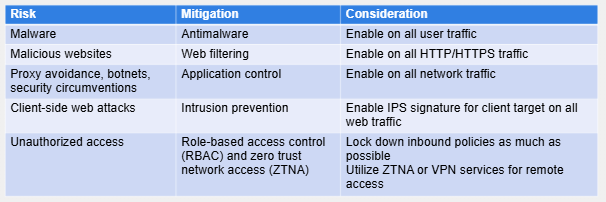
It is critical to understand that SD-WAN itself just STEERS the traffic it does not allow or deny the traffic. A corresponding firewall rule utilizing the SD-WAN zones created is what is required to steer the traffic.
- Inbound to outbound - for DIA it is mandatory to have at least one firewall rule that allows traffic from the LAN (or LANs is VLANs or multiple networks) is allowed to egress out the firewall to the internet. SD-WAN zone will be used as the destination interface for this traffic. It will include the WAN links we have bundled into the zone.
- Anti-Malware, IPS and Web Filtering - These three are the most critical security profiles/features to enable on traffic going out to the internet. Remember that a typical FW is stateful meaning that they will allow inbound to outbound and outbound to inbound for that same TCP session. So if an end-user goes and clicks on a website and accidentally or even maliciously downloads malware we don't want that entering the network. It is best to block it at network level first before endpoint protection level.
WAN options for DIA
As mentioned best to have atleast two WAN links for DIA. And its best to keep it simple and follow best practices for DIA.
- Costly links for critical traffic - We want to reserve these specific WAN links for critical or sensitive traffic. We can create SD-WAN rules to allow this. So basically even if we have an SD-WAN zone that includes these as part of UNDERLAY for example, and they are referenced in FW rules, the SD-WAN rule will be the one actually deciding if the traffic egresses out of that member interface for that zone. If there is a better path available that isn't like MPLS for example, we can configure the SD-WAN rule to use that better path.
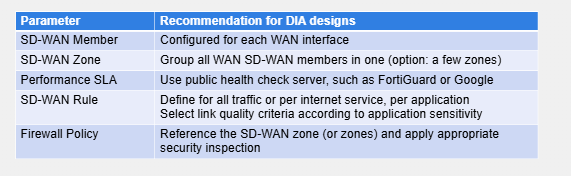
- Define the SD-WAN members - If one member is preferred over another we can put a cost on these interfaces to define this. Higher costs should typically be on costly links. So the way it works is lower cost = preferred, higher costs = less preferred.
- Group the members into Zones. Create separate zones for members that require different security requirements. E.g. internet links may require different security than private MPLS links.
- (optional but recommended) Configure Performance SLA's to monitor those WAN links. We can point to FortiGuard or Google. These performance SLA's will only apply to member links that can reach these publicly available health check servers.
- Configure the actual SD-WAN rule that will define rules for all traffic, or based on an internet service/ISDB, application, etc. Here we define our link criteria so if we want voice traffic to only use a path with low latency we can define it here.
- Reference the SD-WAN zone or zones to a FW policy with the adequate amount of security inspection.
Recommended materials
https://training.fortinet.com/
Comments