Member State Change Actions
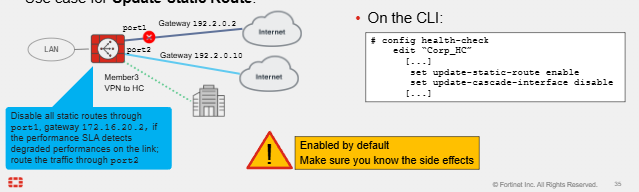
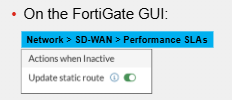
- For each performance SLA configured we can select an action FortiGate takes when the link performance is degraded. It can take the below two actions which are enabled by default:
Update Static Route
- Static Routes are disabled for inactive interfaces. We discussed this previously but the impact of this is that if the SD-WAN member is down, static routes are disabled.
- This can impact NON SD-WAN members which also use this static route to egress out endpoint or user traffic.
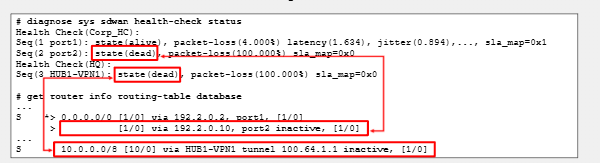
- This can also affect overlay tunnels if those tunnels use this static route for egressing traffic. In our example we can see Port1 has gone down, so the static route egressing port1 has been disabled. For the overlay tunnel to the HQ a new tunnel would need to be configured egressing out port2.
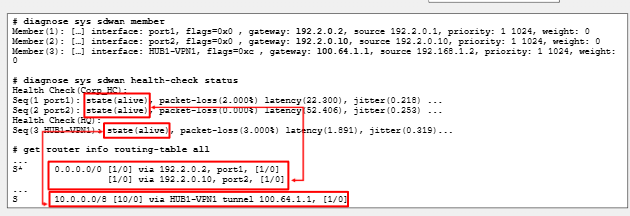
- FortiGate will update the static routes of SD-WAN members that state goes from alive to dead is basically the premise of this feature. The purpose of this is to stop blackhole traffic which may continue egressing traffic out of the dead SD-WAN member.
Update Cascade Interface
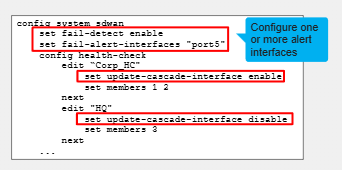
- Enabled by default but only active when a "cascade interface" has been defined
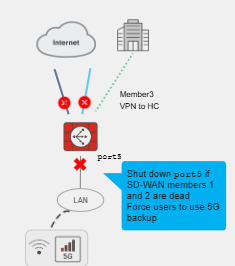
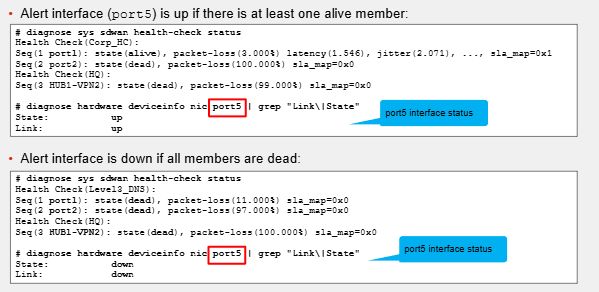
- This is configured under the SD-WAN CLI and we basically set "Alert" interfaces. What they do is shut down an alert interface if all members are declared dead, and bring up alert interfaces if at least one member is alive.
- The purpose of this is to forcing the LAN to use a different device if all SD-WAN members are dead. This means HA is required and that WAN may be down for this device.
- This should only ever really be applied to critical interfaces. For example if we are using VRRF on the LAN interfaces, if that port is shut down because of degraded performance based on the performance SLA it will trigger failover for the LAN traffic over to the configured secondary FW. In the example since both of the ISP links are degraded for this FW the Port5 LAN interface is shut down triggering failover.
Embedded SD-WAN SLA info in ICMP Probes
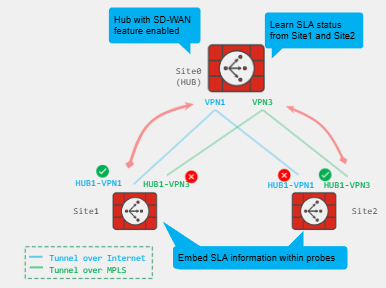
- In Hub & Spoke, if the Hub is unaware of the SD-WAN Traffic steering policies, traffic may be routed over a link different to the preferred spoke link resulting in asymmetric routing where traffic egresses one interface and comes back on another.
- Spokes can pass SLA information to hub through ICMP Probes - SLA status communicated to the hub for each configured overlay. This can be used to provide priority to the IPsec overlay routes. Useful when using BGP or with Static routing.
- Active probe method and the protocol ping must be used within the performance SLA to do this.
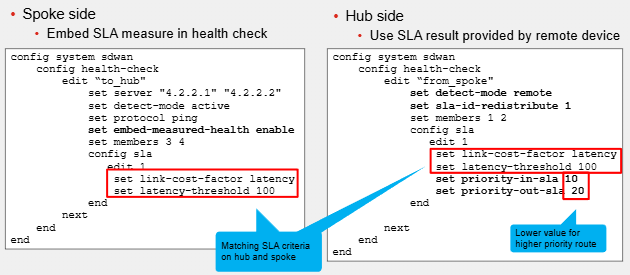
- Spoke - issue set "embed-measured-health enable" under the SD-WAN health-check configuration.
- Hub - Issue the commands "set detect-mode remote" "set sla-id-redistribute 1"
Prioritizing SLA Probes
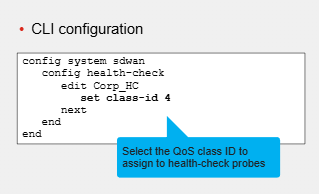
- We can add QoS Values for our Health-Check SLA Probes. This ensured they are prioritised during congestion.
- Recommended to use this.
- However requires monitoring to ensure behaviour is inline with expectations. For example if the path then becomes degraded performance we do not want to keep prioritising this traffic.
Recommended materials
https://training.fortinet.com/
Comments