What are SD-WAN Rules
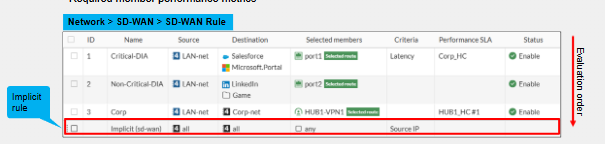
SD-WAN rules are just the rules we create to define how we want to steer the traffic over which links. They look similar to firewall policies however they only work on steering traffic not whether the traffic is allowed or denied.
- Matching Criteria- First we define how does this SD-WAN rule get matched? We do this based on source, destination and application we want to hit this SD-WAN rule.
- Steering Preferences - Here we define the preferred egress members and SD-WAN zones. Recommended to apply performance SLAs. We can have more than one SD-WAN member or zone in an SD-WAN rule, however typically the best one is used to actually forward traffic. Rules are processed top to bottom.
- Firewall rules- As mentioned corresponding FW rules are required for SD-WAN traffic to actually be allowed through the FW.
- Implicit rule - This is used if no SD-WAN rule is matched. Standard routing is done on traffic. Usually load balanced across many SD-WAN members using ECMP.
Traffic Steering Strategies
This is how FortiGate selects which member in an SD-WAN rule to select to steer the traffic. We can do single link (which means if there are two or more SD-WAN members in the SD-WAN rule then it will select the best one) Or we can have Multiple-Link selection strategy (Where we load balance across two or more SD-WAN members in the SD-WAN ruleset)
Single Link Strategies
- Manual Strategy - FortiGate selects the link according to the member configuration order. So whichever FortiGate SD-WAN member was first selected will be the choice. This is very simple to configure and provides link redundancy and is probably the best when you know for sure one link should always be preferred over another.
- Best Quality - The best performing member is selected based on the link quality criteria. Typically based on packet loss, jitter or latency, or all 3 combined. Real time application can be use case here. Since this is dynamic however, it may cause frequent changes on which SD-WAN member is selected which may or may not be desired.
- Lowest Cost SLA- The member that meet the administrator-defined SLA targets are picked. This is best where performance and stability matter most. Link will only fail over/change when the performance is degraded below the predefined threshold the administrator set. This is best for VoIP traffic.
Multiple Link Strategies
- Manual with Load Balancing - Load balancing against all active SD-WAN members.
- Lowest Cost SLA with Load Balancing - Load balancing against all active SD-WAN members that meet the administrators defined SLA Targets.
SD-WAN Route Selection
SD-WAN will steer traffic according to the SD-WAN rule.
FortiGate will route the traffic only if a route exists in the routing table. So for example if we have SD-WAN rules for web applications but no default route, then the SD-WAN rule is useless because unless we have specific FQDNs/URLs for that web destination and point a static route out of the SD-WAN member/zone, otherwise the rule wont do anything.
The route does not have to be the BEST route to the destination, just A route to the destination. This is how it is by default, however we can optionally configure SD-WAN rules to use members with the best route to the destination. We can do this at the zone or service level using the command "Fib-best-match".
SD-WAN for Local out Traffic
Local-Out traffic is traffic that has been generated by the FortiGate itself. Remember that firewall rules apply to THROUGH-THE-BOX traffic. So when traffic is initiated by an end host to a particular destination and needs to go through the FW is when FW policies are applied. Local-Out traffic has its own setup. Local-Out is typically management traffic, such as downloading FortiGuard definitions the connection outbound is Local-Out traffic.
We can route local-out traffic based on the routing table/FIB or steer it according to the SD-WAN rules. Same SD-WAN stuff we have talked about before still apply such as requiring a route to destination, performance SLA etc.
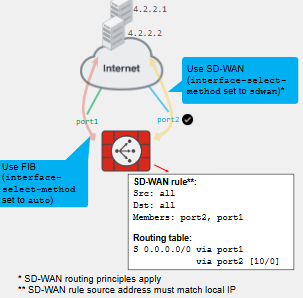
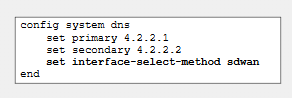
Mandatory to put the "set interface-select-method sdwan" and can be configured per feature such as DNS, NTP, NetFlow, central-management, syslog etc.

Implicit Rule & Load Balancing
As mentioned the Implicit SD-WAN rule steers all traffic that does not match a user-defined rule.
Sd-WAN sites typically have ECMP static routes to the same destination through same members so they will be load balanced. This does not apply to dynamic routing protocols.
We can have the below SD-WAN Load-Balancing Algorithms.
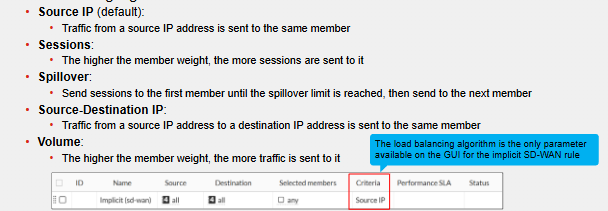
- **Session/Volume Load balancing **- When we set the Implicit SD-WAN rule with session or volume load balancing FortiGate will assign a Weight/volume ratio to each member. This is configured per interface. Session distribution is not proportional to bandwidth/volume it can vary. E.g. sending 10 ICMP ping vs sending a single FTP request, the FTP request will likely take more bandwidth than the ICMP pings, even if ICMP had more sessions. If the spillover or volume distribution exceeds the configured threshold and weight, they will stay on the same SD-WAN member until expiration or forced route lookup.
- ECMP - Supports load balancing for static ECMP routes.
SD-WAN Rules Best Practice Design
Requirements and Constraints
- Decide on the application requirements. So group SD-WAN rules based on High, Medium, Low and time sensitive SD-WAN rules depending on the application.
- What is critical/non-negotiable for the organization
- What the link costs should be and the availability requirements as well as how the failover of SD-WAN steering will work. You need to also decide which links will be part of the SD-WAN and which wont.
Rule Strategy
- Most restrictive SD-WAN rules should be at the top - Critical traffic should typically match these.
- Lowest cost SLA or Best Quality SLA is typically preferred for time sensitive business applications like Webex, Microsoft Teams, and other VoIP applications.
- We can modify these rule strategies per application, ISDB, or per IP.
Reviewing SD-WAN strategies
- Changing networks - Networks and requirements change all the time. What was one critical may be a system decommissioned or no longer used. Putting this as critical traffic would be a waste of bandwidth. Review of networks is required.
- Cabling changes - Link costs and quality can change. E.g. an upgrade of a previously poor link may now be preferred so the SD-WAN rule should be updated to forward to this SD-WAN member.
- Checking hit count - You can check the hit count for an SD-WAN rule under Network -> SD-WAN -> SD-WAN Rule. This helps identifying rules that are being hit a lot or not at all. This can help in forecasting/planning on where links need to be upgraded.
Comments