Key SD-WAN Routing Principles
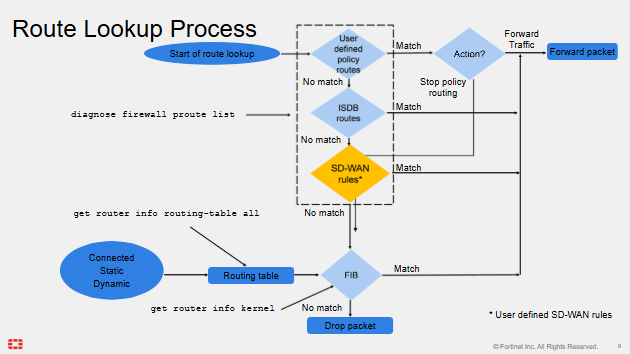
Fortinet explains this best so I have included their slide below:
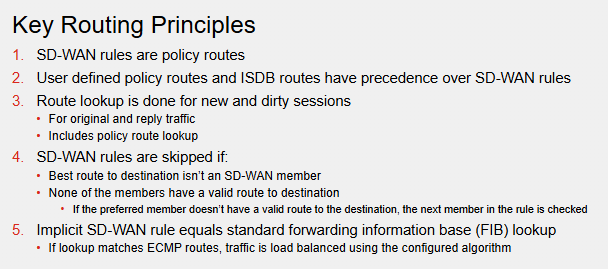
Policy Routes is just referring to "policy based routing" where you basically can overwrite the standard routing table and filter on source, destination, port numbers etc. Its not limited to a standard FIB/RIB lookup. It bypasses it and makes decisions based on what the administrator has set.
For Fortinets SD-WAN implementation, when we create an SD-WAN rule the Kernel installs a policy based route that reflects the source, destination, and services and outgoing interface that we have defined in the SD-WAN rule. As the slide shows, SD-WAN rule policy routes are less preferred than manual policy routes, so make the manual ones as granular as possible to ensure that they do not take over routes that the the SD-WAN Policy Routes would normally do.
Route lookups are performed on both new and dirty sessions. A "Dirty" routing session that must be re-evaluated by the kernel after a session change such as routing, firewall policy or interface change. Route lookup applies to original and reply traffic.
- 1Manual Policy Based Routes
- 2SD-WAN Policy Routes
- 3Standard Routing Table
SD-WAN Policy Rules are skipped if best route to the destination is not SD-WAN member. If it is an SD-WAN member it needs a valid route to the destination.
If traffic doesn't match any SD-WAN rules it hits the implicit SD-WAN rule, the FortiGate does a standard FIB lookup meaning it uses the standard routing table to forward traffic.
Policy Routes
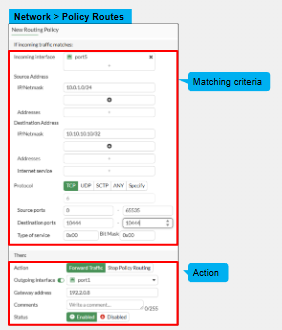
As mentioned SD-WAN routes are essentially Policy Routes. They can match one the below:
- Incoming interface
- Source and/or destination subnets, ports.
- ToS marksings
- Destination ISDBs.
- Protocol
When packets match a policy route there is two possible actions.
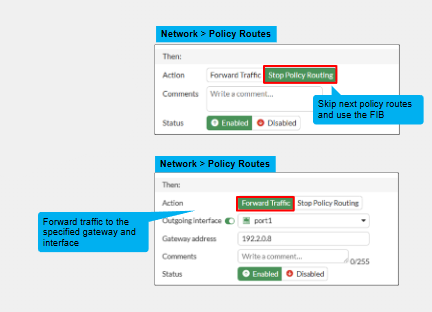
- **Forward traffic Action **- Traffic uses the set outgoing interface and gateway defined in the policy route. If it cant, then this route is considered invalid and skipped.
- **Stop Policy Routing Action **- This skips all policy routes and uses the FIB for standard routing lookups
These have precedence over standard FIB routes. if packet matches valid policy route
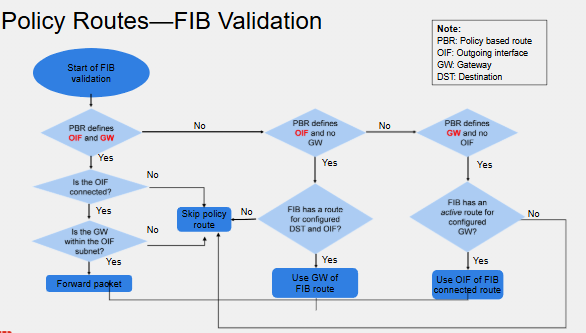
Route Process Lookup
SD-WAN Rule Lookup Process
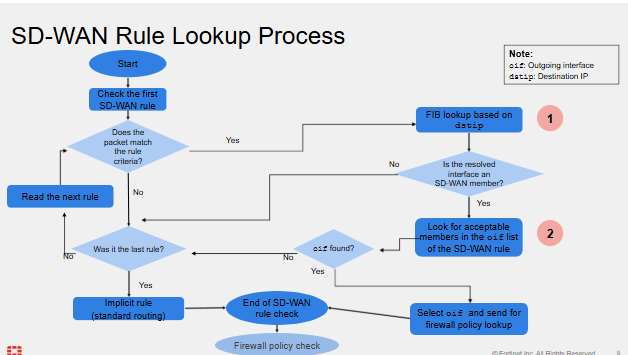
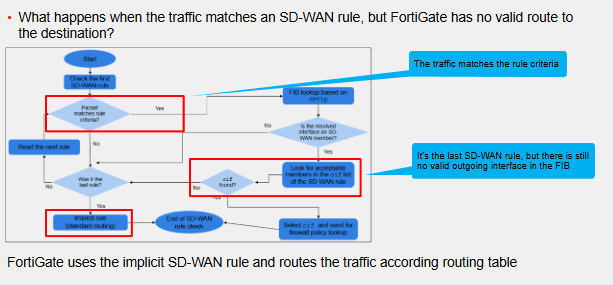
If an SD-WAN rule is matched but there is no corresponding matching route in the FIB, all SD-WAN rules will be skipped and packet will be routed using the standard implicit routing rule. This is important because FortiGate can use any route to steer traffic even routes that aren't the best route to the destination
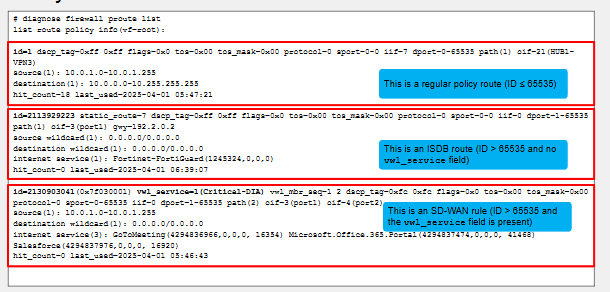
Policy Route Table
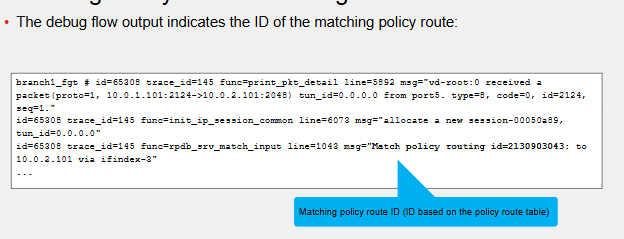
SD-WAN Routing Design
- Number of links available on each site - Consider how many links are available.
- **Number of possible routes **- More sites typically cause more routes which may need more powerful firewalls.
- Static or dynamic routing ? - Decide on whether SD-WAN deployment will use static or dynamic routing or both. Small branch sites may just use static routes for DIA and route to DC while hub sites may use dynamic routing
- ADVPN Consideration - BGP is required for ADVPN
- Ensuring each sites have valid routes - FortiGate requires valid route in the FIB to allow SD-WAN members to steer traffic. The SD-WAN sites should know all possible routes to all possible destinations.
Member Static Routes
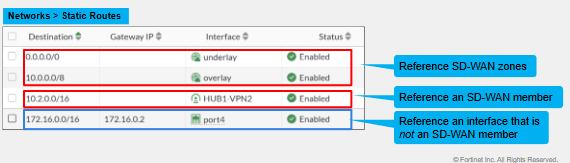
Typically in an SD-WAN deployment we would reference an SD-WAN zone. For example underlay would include ISP and MPLS links all in one Zone with the gateway defined for each SD-WAN member. Then we would have routes and default route using this underlay zone as next hop. For zone static routes we don't have to enter a gateway IP for the zone as it retrieves this information from the SD-WAN members.
However we can have static routes where we don't reference the zone but just the members themselves for granularity.
Overlapped & Duplicate Static Routes
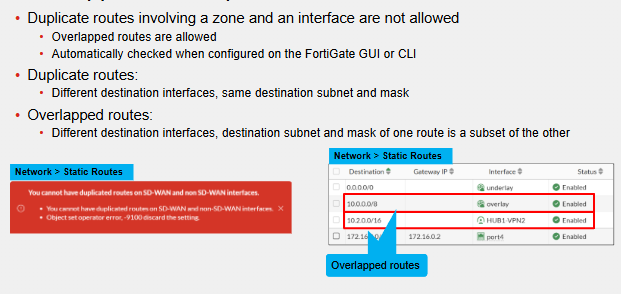
Static Routes for SD-WAN Zones
A static route is created by default for every SD-WAN member for that SD-WAN Zone as ECMP routes with distance of 1 so that SD-WAN routes are preferred. But this can be changed
SD-WAN Member Priority & Member Probe Routes
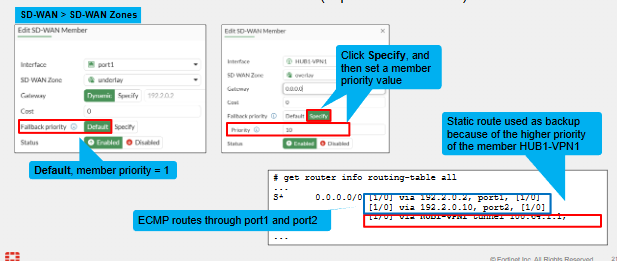
Traffic that does not hit a user defined SD-WAN rule will hit the implicit SD-WAN Rule and traffic routed based on FIB. If we hit a route that does ECMP then traffic is load balanced across both links across all Zone Members even if we do not match an SD-WAN rule.
If we have a scenario where we have internet traffic coming in and hitting both the underlay and the overlay tunnels that are matching this route, but for internet traffic we want the overlay tunnel to be more preferred, we can allow this by modifying the interface parameters. By default the member is 1, the higher the priority the less preference.
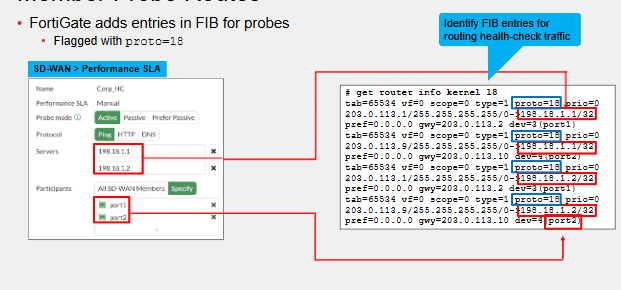
This applies to active monitoring where we have a client and a beacon/alert server that we monitor. FortiGate adds a configured FIB route for the target servers through each monitoring member and gateway. These routes are specially built for this purpose.
SD-WAN Sessions
FortiGate is a stateful firewall. A stateful firewall is one that tracks the state of the session of each traffic flow through the same interface. So for example, if an inside user David attempts to connect to a webpage then the FortiGate will track this session and it will allow the return traffic back in on that same session. However, if that web server then initiates (key word initiates) a new session to David it will be dropped. A new rule from outside to inside sourcing from the Web servers Public IP to the internal server would be needed.
The same behaviour is true when SD-WAN is used. Remember that SD-WAN is just the steering of the traffic. The FortiGate will still use its stateful features. This is fine if the primary SD-WAN member is up and no problems with SLA.
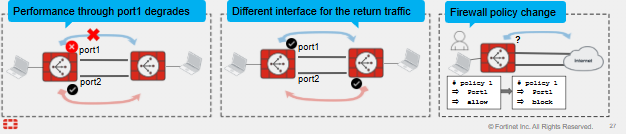
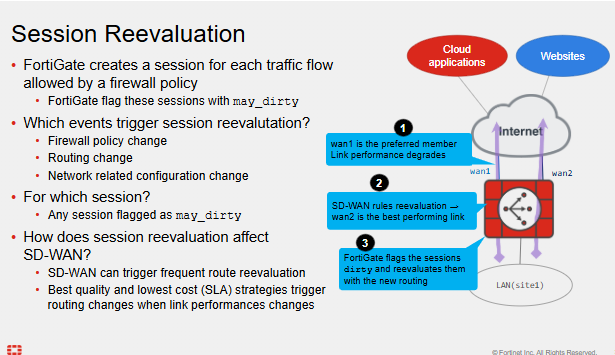
However, the moment there is an issue and the SD-WAN wants to fail over traffic, what will happen to those same traffic flows? If the session initiated on port1 which SD-WAN no longer prefers and now failed over to Port2? Or what if the administrator removes Port1 from the FW policy? -> The FortiGate will re-evaluate all sessions using these flows to reflect the changes. Config can be refined by the administration without causing the issue using specific tools. Dynamic nature of SD-WAN causes a lot of routing changes.
Session table summary
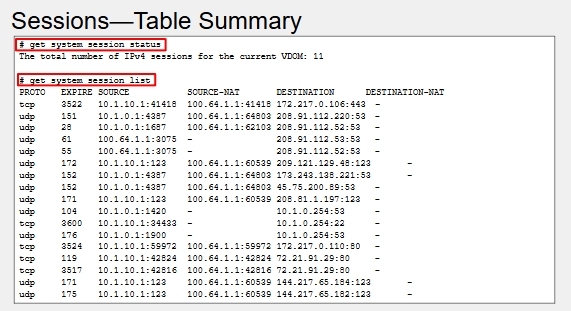
This includes every IP session that goes through or terminates on the FortiGate or is initiated by FortiGate. We can use the grep command on the second one to filter output to a specific source or destination.
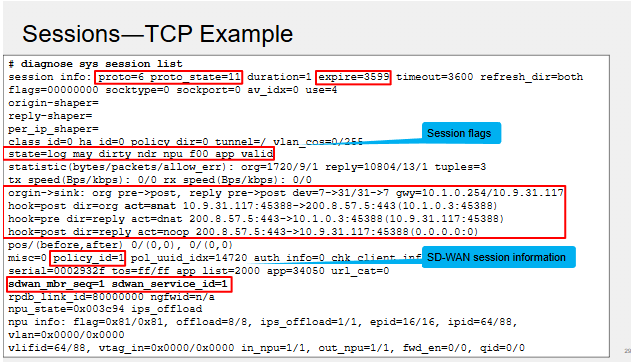
- sdwan_mbr_seq=1 = SD-WAN Member ID
- sdwan_service_id=1 = SD-WAN Rule ID
If matched the SD-WAN implicit rule it will use the standard FIB lookup and routing table and thus we would not see these two values.
May_Dirty Sessions
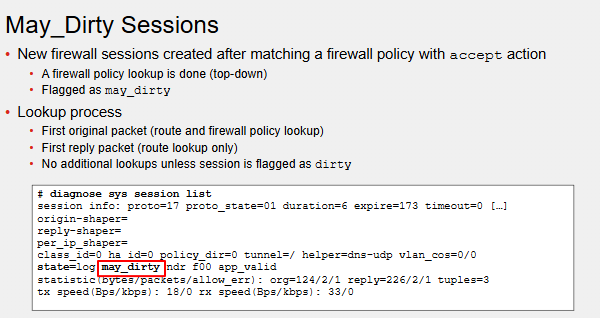
For sessions to be matched, a firewall policy lookup is required - it then selects the first matching policy in the configuration top down like normal ACLs. So most firewall policies will include this "May_dirty" flag under diag sys session list.
For sessions not created by a FW policy lookup - it will do a policy and route lookup upon receiving a packet from the original direction and route only lookup on the first reply packet.
Unless session is flagged as dirty it wont do additional lookups.
Dirty Sessions
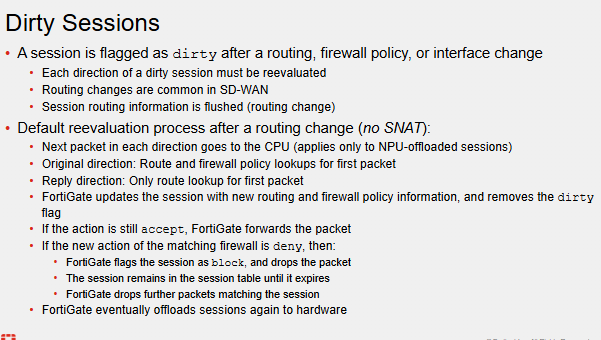
SD-WAN members that are down may cause changes in the SD-WAN routing/FIB tables. This is routing changes that may affect multiple SD-WAN sessions. These sessions get flagged as dirty for a new re-evaluation to occur. The routing information of May_dirty sessions are flushed.
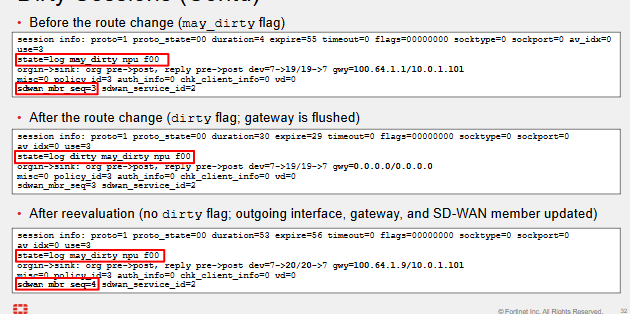
Sometimes the FW policy ID will also change, in this case during the re-evaluation the policy lookup came back with the same FW policy however this may not always be the case. For example, if we have two separate rules to go out to the internet, port1 for rule1 and port2 for rule2. If port1 went down, then the FW ID would change from 1 to 2 during re-evaluation.
If there was only 1 FW policy that had both interfaces as the source interface going out to the internet then it will be the same scenario as the image.
Firewall Policy Requirements
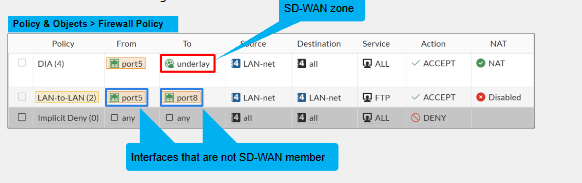
Steered SD-WAN traffic must be allowed by the FW policy. We can only reference the SD-WAN Zone and not the individual SD-WAN Members. We can use non-SDWAN members.
Session Re-evaluation
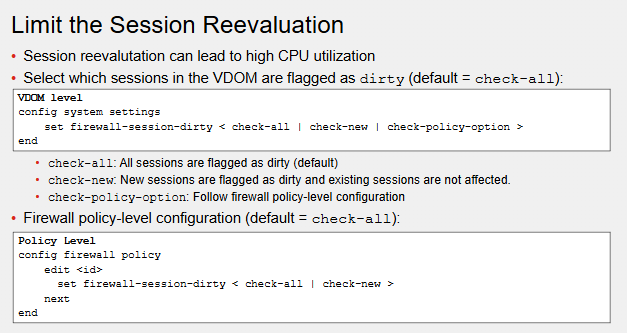
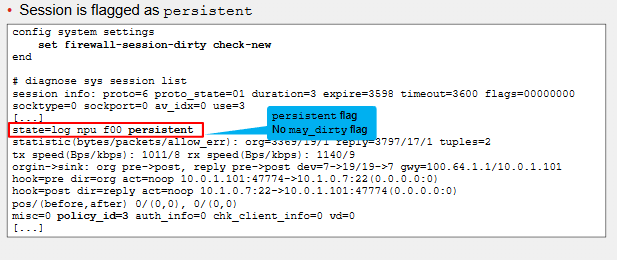
Since this is an established SSH session even though there can be configuration changes there is no may_dirty or dirty flag attached to it. With the "set firewall-session-dirty check-now" command it instead will keep existing sessions unaffected by the changes in configuration or routing changes that don't affect that specific session.
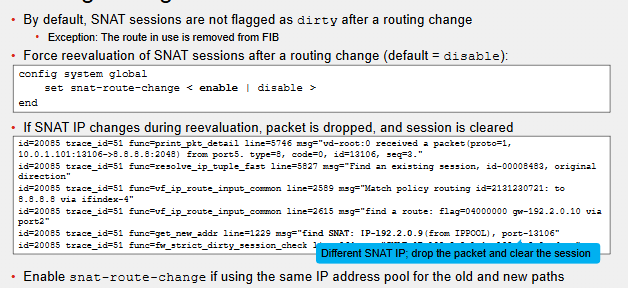
Routing Changes & SNAT Sessions
Interface Stickiness
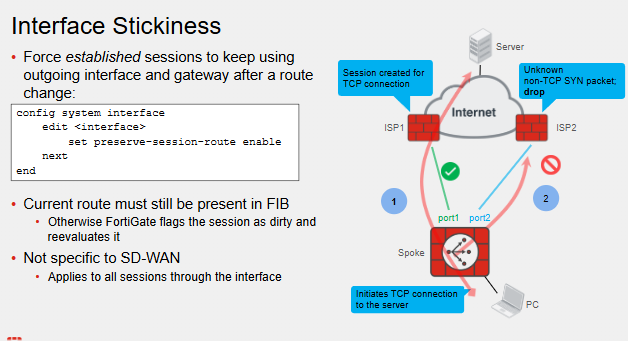
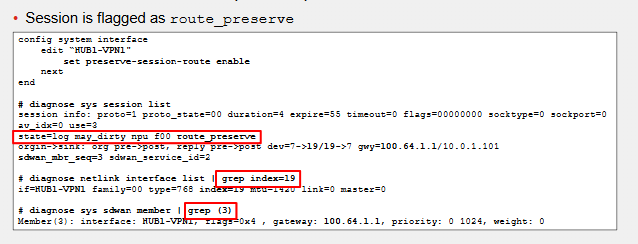
Re-eval of a dirty session following in route change may cause SD-WAN member failover. This can cause issues in terms of TCP connections. To avoid the route change when the route is still available but not the best route (e.g. if performance SLA isnt meeting the criteria) we can make the establish sessions CONTINUE using the old outgoing interface and gateway after the route change.
However, the route must still be in the FIB if its not, then the session is flagged as dirty and re-evaluated.
The command is interface specific and may be applied to some SD-WAN zones and not to others. We can decide.
Cross-FortiGate TCP Sessions
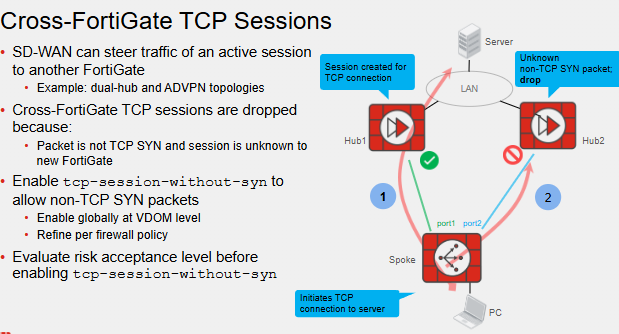
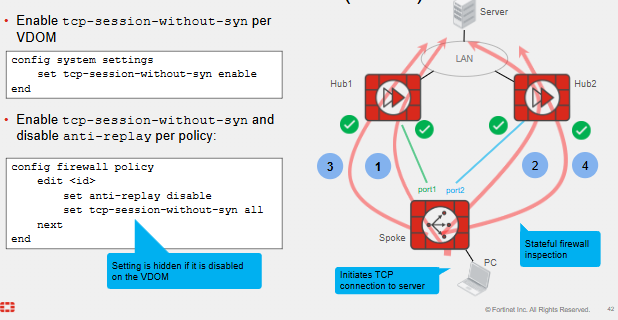
SDWAN can steer traffic of active session to another FortiGate following route or SLA change that affects the session. If the session is TCP ofc if we move it to another FortiGate the session will be dropped due to the second FortiGate being stateful. This is because of TCP SYN and session information is unknown to the new FortiGate.
We can use the tcp-session-without-syn. Its self explanatory. We do require a corresponding FW policy on it to still allow that traffic if not then it will be dropped. This does increase risk. TCP is reliable and secure because of this 3 way handshake. By removing the SYN someone can send a malicious crafted SYN packet.
This should be considered thoroughly and recommended to be enabled on sessions/FW rules that are critical to stay up on.
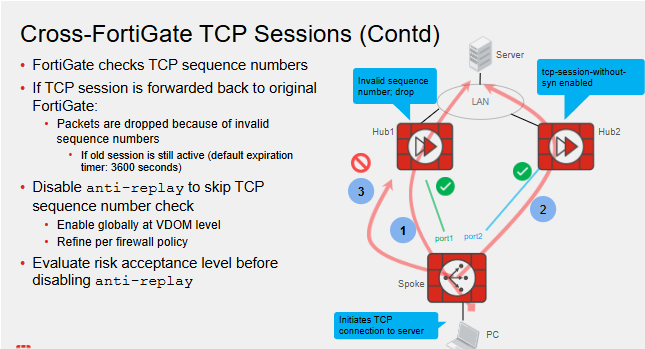
In this example tcp-session-without-syn was enabled on Hub2 and thus when port1 failed over to port2 it worked fine. But then port1 comes back online within the 3600 seconds and since it still has session state information great? No... because the FTG also tracks sequence numbers and the sequence numbers will not match on the Hub1. Anti-Replay needs to be disabled and it skips TCP sequence numbers.
Comments