Underlay vs Overlay
Underlay & Overlay are used to describe the link type of an SD-WAN member.
**Underlay: **
- This is the physical cabling that typically for SD-WAN is provided by the ISP. This can be ethernet, DSL, Fiber, MPLS, 4G/5G/LTE etc.
- These links can be rented or brought from an ISP.
- Underlay is the physical infrastructure required for delivered packets out to the internet.
- Traffic that goes through the underlay is restricted to the routing policies delivered by the ISP. In ISP world they would use something called RPL, or routing policy language to do this, alongside ACLs, QoS police shaping etc.
- The packet source & destination address must be routable through the ISP domain.
- Typically the packets for underlay is NOT encrypted by the ISP.
Overlay:
- These are virtual links that are built on top of underlay links.
- Examples are IPsec, GRE, etc.
- When using IPsec we typically do ESP encapsulation, this makes it so that the packets going through the ISP domain are no longer restricted.
- This also provides better security.
SD-WAN Zones
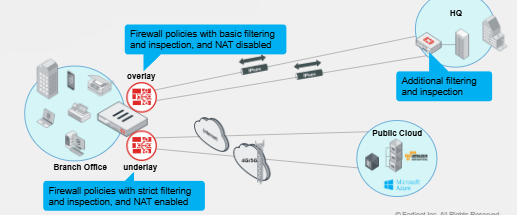
- Typically we apply different SD-WAN policies based on the link type of the SD-WAN members. An example is that for underlay links we would likely want strict filtering and inspection and NAT enabled to protect our internal subnets over internet or MPLS links or other links that are going to the public Cloud or other services.
- Meanwhile for Overlay links have NAT disabled and Firewall policies with limited inspection because traffic is already being encrypted by IPsec inside the tunnel.
- Also if we are using IPsec overlays typically we are connected to a remote site where we can have the remote site do the additional filtering and inspection.
- In general Overlay to access business/corporate resources, underlay to access public services.
- Zones can be configured to combine SD-WAN members that need similar SD-WAN policies/rules.
- By putting SD-WAN members into Zones we can put same set of firewall policy to a zone rather than individual members. This helps for administration.
SD-WAN Member Configuration
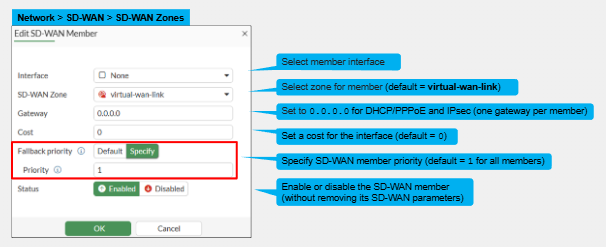
- The SD-WAN GUI only shows interfaces that are eligible to become SD-WAN members. Meaning interfaces that are currently referenced in FW policies or routes must use the "integrate interface" option instead.
- A member can only be assigned to one SD-WAN Zone.
- The Gateway indicated the IPv4 gateway to use for the SD-WAN member.
- One gateway per member.
- Priority is for SD-WAN members to prioritize the Static Routes they create
SD-WAN Zone Configuration
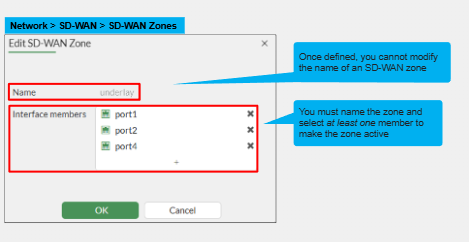
- A Zone must have a name.
- Must have one or more members. Atleast one active member required.
- Cannot change the name of the SD-WAN Zone. If name change is required a new Zone will have to be created and you'll have to remove the members from the current Zone and then put them in the new Zone.
SD-WAN Member & Zone CLI Configuration
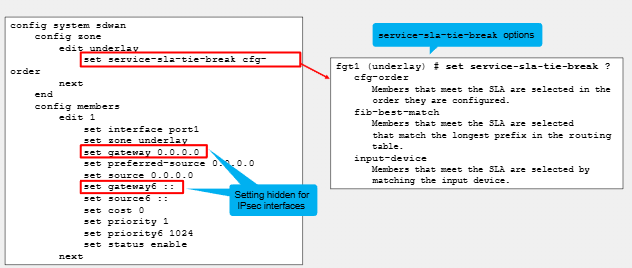
- This is the equivalent of the previous GUI versions to configure members and zones.
- The command "Set service-sla-tie-break cfg" is set by default and this parameter informs FortiGate to select members in the order they were configured if each member meet the SLA Criteria.
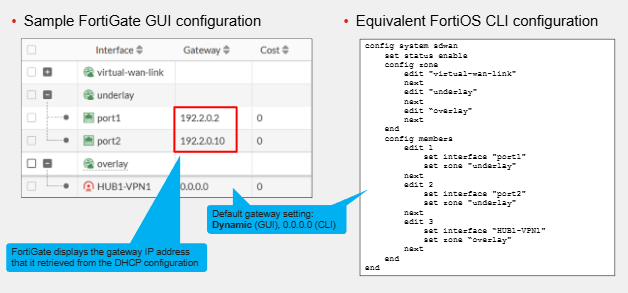
- Port 1 and 2 got their IPs from DHCP in this example
SD-WAN Members & Zone CLI Verification
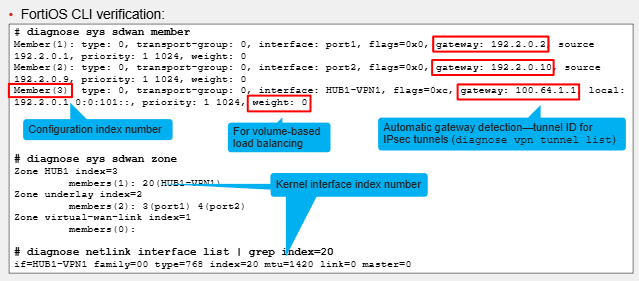
- Diagnose sys sdwan member - Shows the configuration of each SD-WAN member. Configuration index should match the member index but this can be changed. For IPsec tunnels it will dynamically learn the gateway and use the tunnel ID. Usually this is the remote gateway configured in the Phase1 gateway of the IPsec configuration.
- Diagnose sys sdwan zone - Shows the configuration of the SD-WAN Zones and the members of the Zone.
Recommended materials
https://training.fortinet.com/
Comments