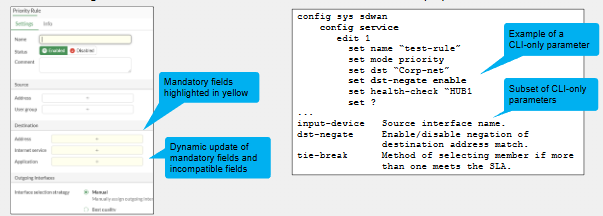
The FortiGate SD-WAN rules can be configured via GUI or CLI.
The CLI includes all of the SD-WAN advanced parameters. Its important to note we can create new SD-WAN rules using the CLI or refine rules that we have defined on the GUI. So set it up easily on the GUI first then adjust with the features required only accessible via CLI.
GUI Configuration Guide
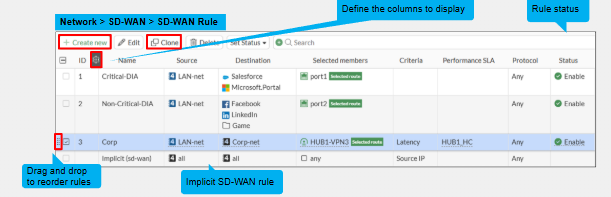
The GUI is useful for common parameters and very easy to define the SD-WAN rule parameters however it does not include all the advanced options.
We can create SD-WAN rules by going to Network -> SD-WAN -> SD-WAN Rules where we can create a new SD-WAN rule or clone or modify/rearrange or enable/disable SD-WAN rules as per our requirements.
CLI Configuration Guide
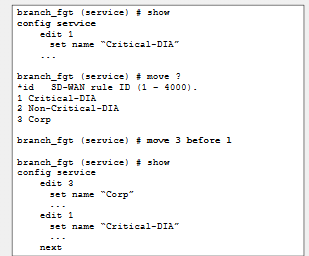
Typically should be used when we want to check advanced paramaters not available on the GUI.
The CLI refers to SD-WAN rules as "services".
- **Reorder Services **- Use the command "move"
- Review SD-WAN configuration - "show full configuration"
- Reviewing Advanced SD-WAN capabilities available - Under config service issue "show ?"
Chosing Best route as the Preferred SD-WAN member
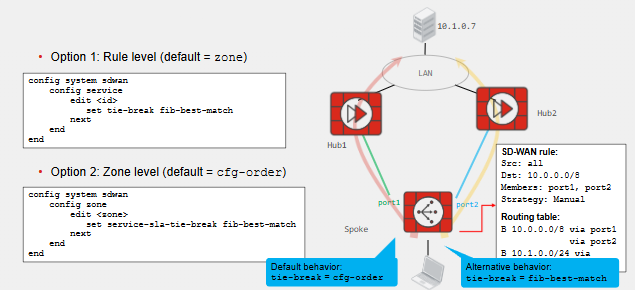
This is referring to the FIB best match. By default SD-WAN chooses A route to the destination not the "BEST" route to the destination.
- 1SD-WAN Rule Lookup check is initiated
- 2SD-WAN Member Routes checked twice.
- 3SD-WAN Skips SD-WAN rules if the best route to the destination is NOT via an SD-WAN Member
- 4Once route matched, SD-WAN rules skipped if none SD-WAN Members have a valid route to the destination
- 5Route does not have to be the best route to the destination
- 6Default Behaviour uses tie-break = cfg-orderThis means link is selected based on higher priority/port order configuration if manual strategy. In the example Port1 is selected as the order is 1.
- 7Alternative Behaviour - tie-match = fib-best-matchBest route to the destination is considered when choosing preferred SD-WAN members in the rule. In the example Port2 is selected as it has the best route to destination. Applies to all SD-WAN strategies
Fib-best-match works on all SD-WAN strategies. Manual is obvious based on port order in the SLA Strategy.
For Lowest Cost SLA the best route from the SD-WAN member is chosen.
We can configure this at the SD-WAN member zone level or we can configure it at the rule level for extra granularity. If we do it at the zone level its less granular. Applies to all rules using these SD-WAN member.
System & SD-WAN Load Balancing Configuration
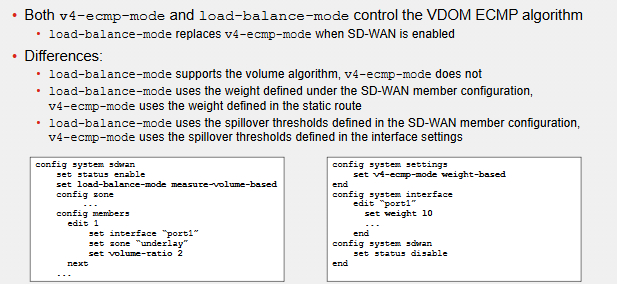
- **v4-ecmp-mode **- This defines the algorithm used to load balancing sessions that match ECMP routes in that SPECIFIC VDOM. When enabling SD-WAN this option is hidden and replaced with the Load-Balance-Mode under the config system sdwan
- Load-balance-mode - The main difference between these both is that this version supports the volume algorithm. When enabled weight and spillover are now instead configured under the SD-WAN member section. When SD-WAN disabled these settings are defined under the "config system interface"
Monitoring Rule Static
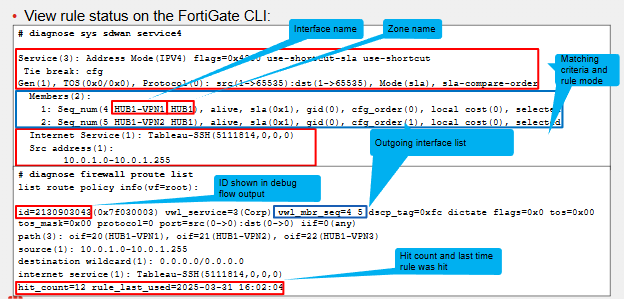
SD-WAN rules dynamically updated based on SD-WAN member status and performance. This results in possibility of outgoing interface list changing over time
- **diagnose sys sdwan service4/6 **- This allows for checking the matching criteria, rule mode and outgoing interface list.
- **diagnose firewall proute list **- SD-WAN rules are essentially policy based routes so we can check rule from policy route view. SD-WAN rules assigned an ID number, its the same ID shown in the debug packet flow when a packet matches an SD-WAN rule. Interface preference shown from left to right. Rule hit count and last time the rule was hit is also displayed.
Comments