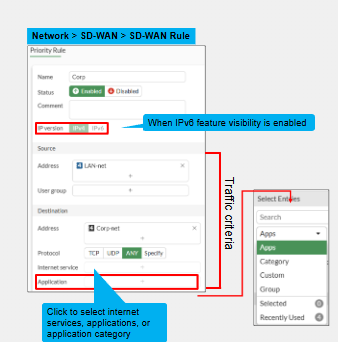
As has been mentioned before we can match traffic based on the below. Both IPv4 and IPv6 can be used but by default rules only apply to IPv4. Under feature visibility IPv6 needs to be enabled.
- Source IP address/User/FSSO group
- Destination IP & Protocol, ISDB or application/application category
This provides a lot of flexibility as we can match application traffic for Facebook for specific source IPs, or specific user groups
ISDB
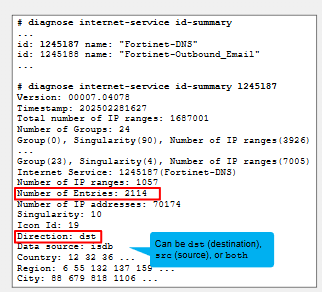
ISDB is a database managed by FortiGuard that includes the most popular internet services. Each internet service is comprised of the below:
- **Assigned an ID **- Each internet service has an ID value assigned to it. This represents this internet service
- Range of public IP Addresses- We may see a range of public IPs or FQDNs/URLs used to identify the traffic for this application.
- IP protocol- The IP Protocols required to communicate with this application. Including the destination Port.
- **Direction **- This indicates the direction that this particular internet service can be used either source or destination or both. For SD-WAN rules however we can only use internet services for direction destination, or both source and destination.
These IDs are loaded into the kernel and ready to used. It can be utilised not only in SD-WAN but normal firewall rules as well.
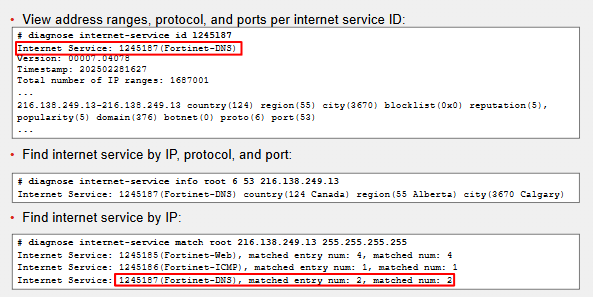
- diagnose internet service id-summary [optional | ID number] - This shows all the Internet service IDs in the FortiGuard database. Add an ID number to drill down into it and gather more information.
Applications & Categories

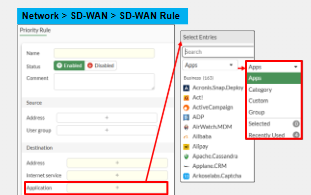
We can match SD-WAN rules also based on the below:
- Application - Can use a pre-determined one or create a custom application. The pre-determined ones are sourced from the FortiGuard database.
- Application Groups - A user defined group that contains applications
- Application Categories - Predefined group of applications per category. For example, buinsess, game, proxy etc
Application filter for SD-WAN is hidden by default, can enable using the config sys global -> set gui-application-detection-sdwan enable -> end
Application detection relies on the below:
- IPS Engine managed by FortiGate
- Application control database maintained by FortiGuard.
Application Aware Routing
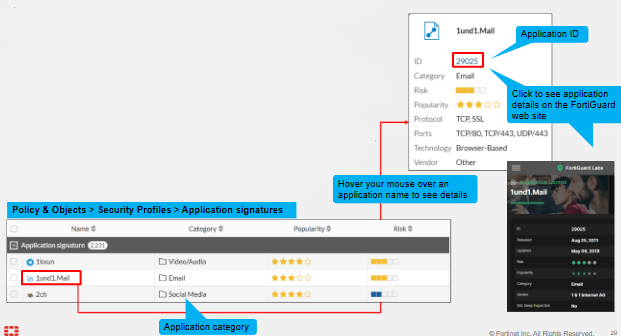
Using an Application to steer traffic once an application is detected is known as application-aware routing. As mentioned this relies on IPS and application control signatures. These are downloaded automatically by FortiGate.
- Application Control Policy - This is mandatory to enable on the firewall policy.
- Full SSL Inspection - This may be required for some TLS applications. It has to decrypt the packet and check the SNI field of the packet to find out what this application is. Since TLS is encrypted by default we cant see this in a normal packet - thus the SSL/TLS Inspection requirement. Other traffic may just be fine using certificate inspection. We can verify if this is needed by checking the application information on FortiGuard.
- User-defined application definitions - An administrator can define their own application definitions. For example to allow FortiGate to recognise a proprietary company application.
Application Learning
- Application Cache - Populated dynamically by learning from the traffic that flows through it. This cache includes a list of application IDs with destination address, protocol and port. Entries remain for 8 hours in this application cache if they are not matched.
- Once traffic is allowed through a FW rule that has application control enabled it is sent to the IPS engine to be analysed.
- If destination address, port or protocol do not match an entry in the application cache FortiGate cant immediately identify the application - so it forwards traffic using an SD-WAN rule and FW rule that do not require an application match.
- If the initial packets require application detection then the policy will use IPS engine. IPS engine analysed the traffic and identifies the application. This is the application learning phase. This is then stored in the application cache which FortiGate can use for subsequent sessions to steer traffic according to the SD-WAN rules.
Below is a great summary and diagram by FortiGate on this process
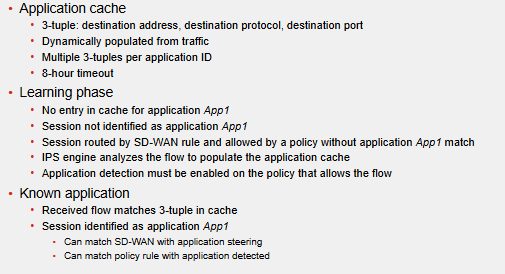
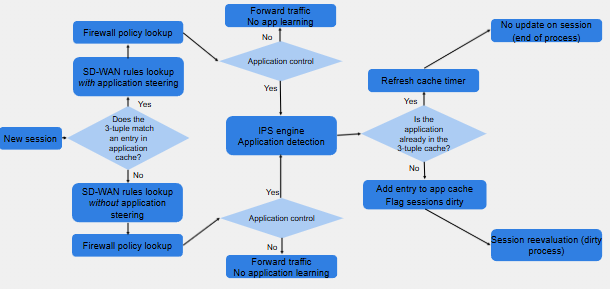
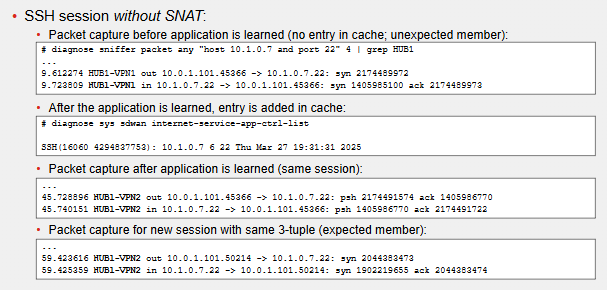
FortiGate has to look into packets and classify what application it is. However during this learning process it does NOT stop the forwarding of packets. This means the first few packets may not match the SD-WAN rule we expect. There must be a match in the application cache.
If the FW rule that allows the flow has application control, application analysis starts using the IPS engine.
If FortiGate flags the session as "dirty" it can re-evaluate the application/session and can now match an SD-WAN rule using application steering.
Monitoring Application Control Database
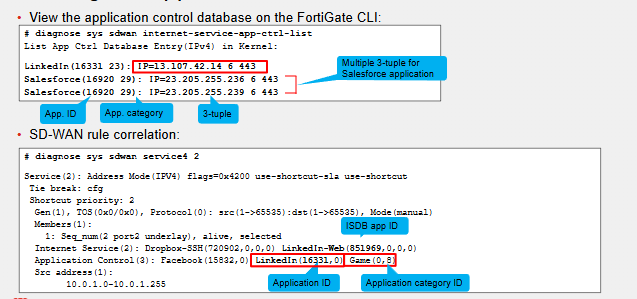
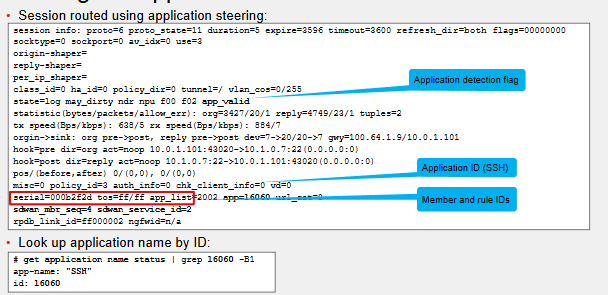
Application information written to the SD-WAN session.
Unexpected Routing During Application Learning
Comments