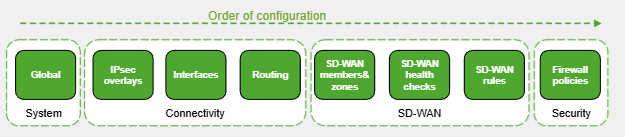
- Above is Fortinet's recommended approach of configuring SD-WAN.
- System - The global system settings such as hostname, setting up DNS, licensing etc.
- Connectivity - IPsec Overlays may not be required in a DIA setup, but all other setups an IPsec overlay is required. IP addressing, routing, admins etc must be configured for the FortiGate device.
- SD-WAN - The SD-WAN specific tasks such as defining Members, Zones, and SD-WAN rules
- Firewall Policies - Finally we have to configure the Firewall Policies.
SD-WAN Concepts
SD-WAN Members & Zones
SD-WAN members are the actual underlay FortiGate interfaces that are participating in SD-WAN. For example we can define this as port1 and port 2. We can name these interfaces as ISP1 and ISP2 and we can then put them as members in something called a Zone. A Zone is just a collection of members. That's it. its just a group of members. We typically call this overlay or outside.
Fortinet demonstrate how to configure all these very well so I have taken these screenshots. Please see them below:
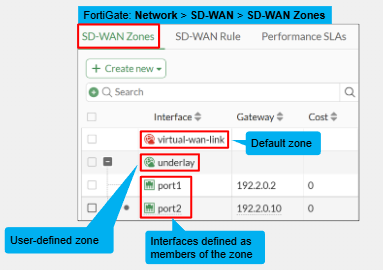
- Members do not have to just be physical links, they can be logical as well.
- When an interface is assigned to a member, it must then be assigned to an SD-WAN Zone.
- We can reference these Zones inside of a Firewall Policy.
- The Gateway is the next hop to forward traffic through the Zone members
- We can assign any name we want to an SD-WAN Zone.
Performance SLA
This refers to defining health checks to monitor the quality of an SD-WAN member/s. It checks for any link degradation and if there is, then it can determine the most qualified SD-WAN member to steer the traffic. Its essentially just metrics, like if we get 10% packet loss on this ISP1 interface (port1) then switch over to using ISP2's link.
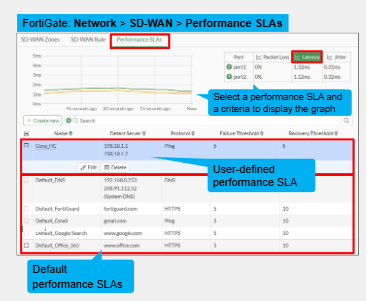
- We can monitor the health of SD-WAN members inside a Zone on the performance SLA page. It measures if the member is alive or dead and the performance of that member.
- This is used to then make SD-WAN traffic steering decisions based on the SD-WAN rules.
- We can have situations where the interface is up but the actual corresponding destination is dead, FortiGate can flag this and then use a different interface.
- We can create our own entries for performance SLA's and can also define if the health monitor should be active or passive.
- Active = Periodic Probes to the configured Health Check Server. Probes sent every 500milliseconds. The server acts as a Beacon
- Passive = Based on member traffic
SD-WAN Rules
SD-WAN rules is how you define the traffic steering rules/strategy. Usually defined with focus on the applications most critical for the application. Each rule define the traffic matching criteria by IP/Application and the selection criteria for the outgoing interface. The admin can use the link quality check by the health checker to decide which interface dependant on which link has lowest latency or packet loss. So if we have 3 Internet links:
- One can go out of the lowest latency (voice)
- One can go out the one with least packet loss (critical)
- And the rest can go out of the last interface for all other traffic.
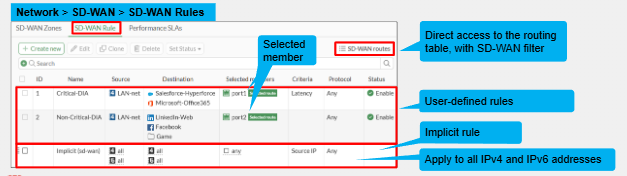
SD-WAN rules are evaluated the same way as Firewall rules from top to bottom based on first match. But SD-WAN is only to steer traffic not to allow or deny the traffic. We will discuss later but there must be a corresponding firewall rule to allow the traffic.
Implicit rule is used when no SD-WAN rule is matched. It applies to all other sources and will use the default load balancing over the best interfaces.
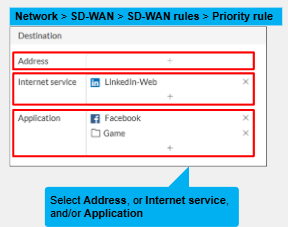
SD-WAN destination can be any of the below
- Addresses - Either a single network address or a subnet range or both.
- Internet Address - These will be ISDB (Internet Service Data Base) These can be pre-defined or specific customer internet services. There are many ready to use ones loaded to the firewall by default. ISDB is maintained by FortiGuard and composes of many well known internet services and has their FQDN's/IPs/Ports. For example, AWS, Salesforce, Facebook, Instagram etc.
- Application - This is not visible by default. Internet service and application can be used in one rule. It relies on FortiGate's Application Detectors to detect the application. FortiGate has to discover what application is in use from the first packet in the application flow
Application Detectors
Application detectors are defined based on the below:
- Application
- Application Category
- Groups of application.
As mentioned application detetion is not enabled by default and must be enabled by the CLI. Application control is also required.

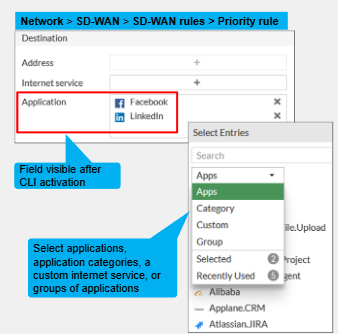
We can decide to have applications like games go over low quality links and more important applications/business traffic over more costly links. To determine which application is flowing through the network is matching the defined application detector, use the command "diagnose sys sdwan internet-service-app-ctrl-lis
Firewall & Routing
SD-WAN does work with other features and some of those features of FortiGate may be required in order to allow SD-WAN to steer traffic. For example, static & dynamic routing determine all possible routes to steer the traffic, and the FW policy determine whether traffic is allowed out or not dependant on the security profiles configured.
Routing:
- While SD-WAN rules do define traffic steering policies, but the traffic isn't forwarded to an SD-WAN member unless there is a valid route to the destination outside of that interface.
- We can use static and dynamic routes. For AD-VPN iBGP is required. BGP is the recommended dynamic routing protocol.
- Static routes are more for small topologies or to define the default gateway. This is the common use but it depends on the organisation.
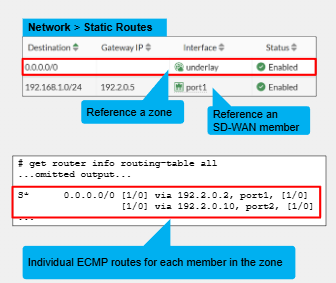
- When doing routes for SD-WAN we typically reference the SD-WAN Zone, if the Zone then in the routing table there will be ECMP routes load balancing across the members in that SD-WAN Zone to that destination. When using a Zone we don't have to specify a gateway as SD-WAN gets the gateway from the SD-WAN members configuration.
- We can also reference the individual members for granularity within our routes.
Firewall Policies:
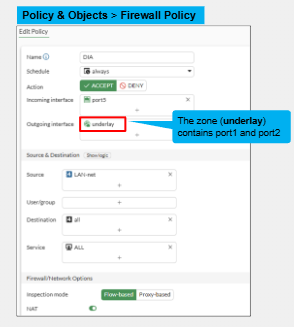
As we have mentioned for SD-WAN rules a corresponding Firewall Policy is required. We reference this the exact same way as we do normal firewall policies. The only difference is we reference the SD-WAN zone in the outgoing or incoming interface. We cannot reference an SD-WAN member directly it must be in a SD-WAN zone with a single member if we want that granularity.
SD-WAN CLI Configuration
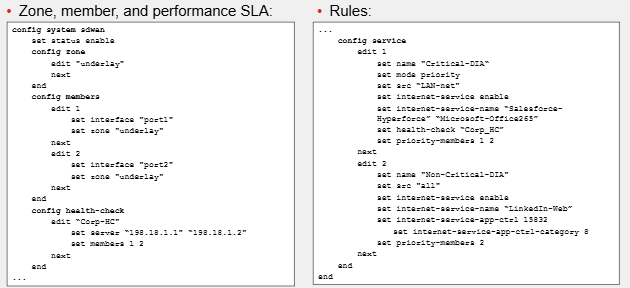
Migrating Interfaces to SD-WAN
- Before an interface can be migrated to SD-WAN it must be unreferenced from any firewall policies. If we have many references this can be very disruptive.
- Use the integrate interface on the interface page of the Network > Interfaces page. This allows for instructing FortiGate to migrate an interface to SD-WAN. You select the destination SD-WAN Zones and the selected actions for each reference. So for example if it is referenced in the FW policy you can have it delete the reference or you can have it be replaced by the SD-WAN Zone.
- Useful for transitions to SD-WAN without FortiManager such as a DIA FortiGate site.
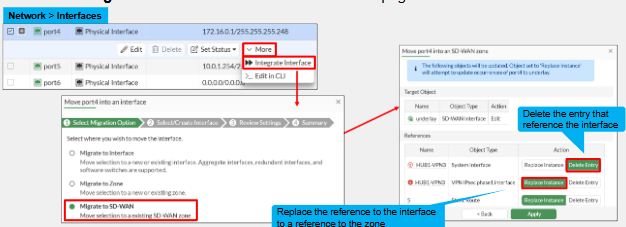
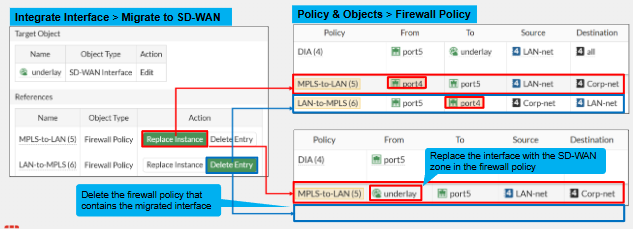
- This is self explanatory but replace instance replaces the physical SD-WAN member with the SD-WAN Zone.
- Delete entry deletes the FW policy referencing the SD-WAN Member that is not referencing the SD-WAN Zone. Even if there are destination interfaces that aren't migrated to SD-WAN the delete entry option will delete the FW policy entirely. This will impact policy ID numbers.
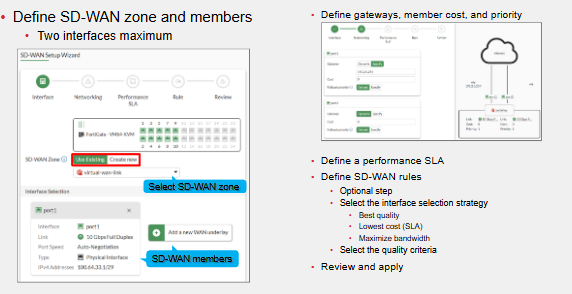
SD-WAN Setup Wizard
This is available from FortiOS 7.6.1. This is the configuration guide of basic SD-WAN setup.
- Zone and members are defined first
- Then the networking
- Performance SLA is then configured.
- SD-WAN rules are defined last.
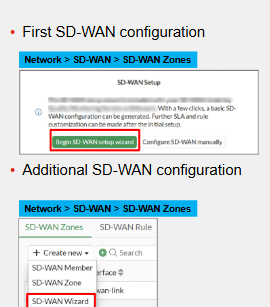
This is a licenced feature and requires the SD-WAN Service Bundle.
Comments