What is SNMP?
Simple Network Management Protocol is a very important protocol that assists in the management of our networks. SMB's (Small-to medium) sized businesses can have hundreds of network devices ranging from standard desktop devices to AP's, to switches, routers and more. We always want to be aware what is happening with these devices.
What do we want to monitor on these devices? Below are some examples:
- CPU warnings - CPU spikes over configured threshold, temperature warnings etc
- Environmental Conditions - In a DC HVAC is critical to monitor. Also some countries may be averse to more heat, so heat monitoring is important.
- Forecasting - If we see we are getting frequent overloading or over usage of bandwidth, this can help in forecasting and planning of more switches/routers or cabling. It also goes the other way too, if we are underutilised we can reduce devices and costs. We can even monitor electricity power draw using SNMP.
- Infrastructure changes - BGP routes being withdrawn, OSPF neighborships going down, interface changes, WAN interfaces going down, Firewalls not responding etc.
It is not practical or feasible to go on hundreds if not thousands of routers to grab these outputs and data. We have two options.
- Poll this data - We passively or proactively poll data we require from the network devices.
- Traps - The devices themselves send us the data proactively.
There are other protocols that can be used for network management.
- Netflow
- Syslog
Characteristics of SNMP
- SNMP is an Application-Layer Protocol.
- In SNMP we have the concept of NMS (Network Management Station) and Agents. NMS is the ones receiving the data, and the Agents are the network devices themselves.
- SNMP uses UDP port 161 and 162.
- SNMP has 3 major versions, SNMPv1, SNMPv2c and SNMPv3.
SNMP Components
SNMP consists of 3 parts that interact with each other in order to configure and exchange SNMP packets between network devices and NMS. These three components are listed below.
- SNMP Manager - This is known as the SNMP server or NMS. This can be free or paid software that can be installed on a PC or Server. Some well known ones are SolarWinds, Logic Monitor, PRTG, Nagios etc.
- SNMP Agents - This the SNMP software residing on the network devices. Basically in essence its the device we are attempting to monitor. In general most network devices that can communicate on the TCP/IP stack and has a CLI can be configured as SNMP agent. Examples are IP phones, routers, switches, firewalls etc.
- MIB - This is the Management Information Base. Variables are stored inside of the MIB on the agent device.
How the MIB Works
For example if we want to poll interface status of Gig1/0 of R1, the NMS sends a GET request to the agent. It asks the device what is the interface status of Gig1/0. R1 will look inside its database to confirm which interface and what the status is. The MIB is a tree structure that contains all this information inside of OID's. OIDs are object ID's inside of MIBs.
Every process on an SNMP Agent that we want to query whether its about environment variables or hostname, it will all be stored in the MIB which has OID's which correspond to those specific values. There will be an OID for hostname, and one for interface status as examples. The MIB is stored on the SNMP Agent, and OID's are stored inside the MIB.
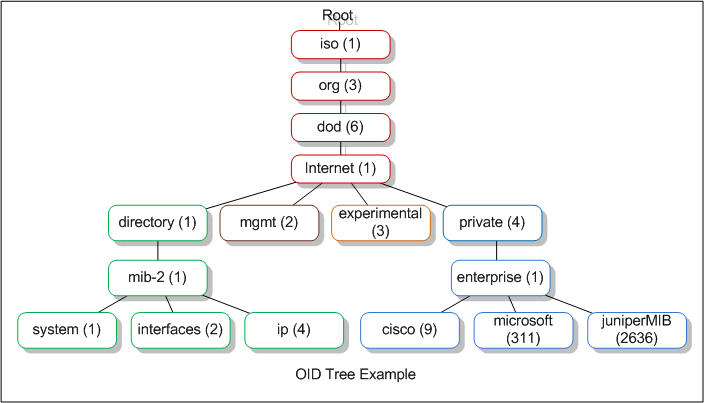
A MIB is a hierarchical tree structure. Below is an example of an SNMP MIB:
- 1SNMP NMS sends GET Request to SNMP Agent
- 2SNMP Agent queries MIB databaseMIB includes specific OIDs which includes interface ID, hostname etc
- 3SNMP Agent will send a response back to the SNMP NMS
SNMP Architecture
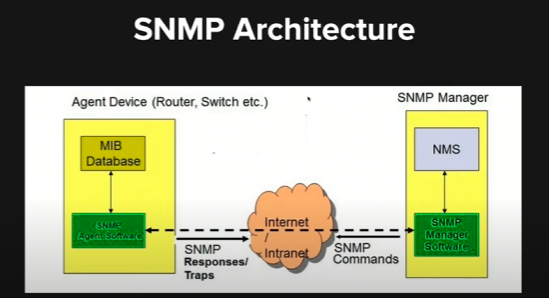
- We have a server or pc that has an NMS on it - Free or Paid it does not matter.
- Communicates over IP/UDP, as long as reachability on UDP 161 and 162 we can use this over the internet or private MPLS/WAN links across sites. In real life however, I have seen cases where SNMP has been configured for other ports, and this is indeed possible but it needs to be configured on the SNMP agent and manager.
- On Agent side we require agent software - This is preloaded on the IOS software. We just have to configure SNMP and all MIBs and OID's preloaded/configured.
- The SNMP Server will send a get request to the SNMP agent when it wants to poll data. For example if we look at the below SNMP tree example, if we want data about the interface, it will reference the OID 1.3.6.1.1.1.2.
- This is how the SNMP Agent knows what OID is required. Each OID is unique when the SNMP server references this in the request.
SNMP PDU/Operation Types
SNMP Get & Response
We have an SNMP Get Request Operation. This is a type of message that an SNMP Manager/ NMS to the actual SNMP agent. This is a client server technology meaning that the actual SNMP Manager is the client and the SNMP Agent is the actual server.
Why? Because the server is the one serving the information, in this case the network device and the client is the one requesting this information. So the NMS is the client. Once the agent gets the request, it will send an SNMP Response
SNMP Set
This is for making configuration changes. We can do this from the NMS. For example we can use the set configuration changes on the network device.
SNMP Trap
An SNMP Trap is generated by the SNMP Agent (which is the server) when the configured parameter/threshold or error condition has occurred. This is then transmitted to the NMS. Since we are using UDP there is no concept of acknowledgement of receipt of this SNMP trap. SNMP Trap is configured on the SNMP agent itself as it has the SNMP MIB/OIDs.
SNMP Inform
This is similar to SNMP Trap but it allows for acknowledgements of SNMP Traps pretty much. It is only supported in SNMPv3. It is still UDP but we are expecting a response from the NMS. If no response, we send another request to the NMS.
Recommended materials
https://my.ine.com/Networking/courses/2e2f8584/snmp
Comments